
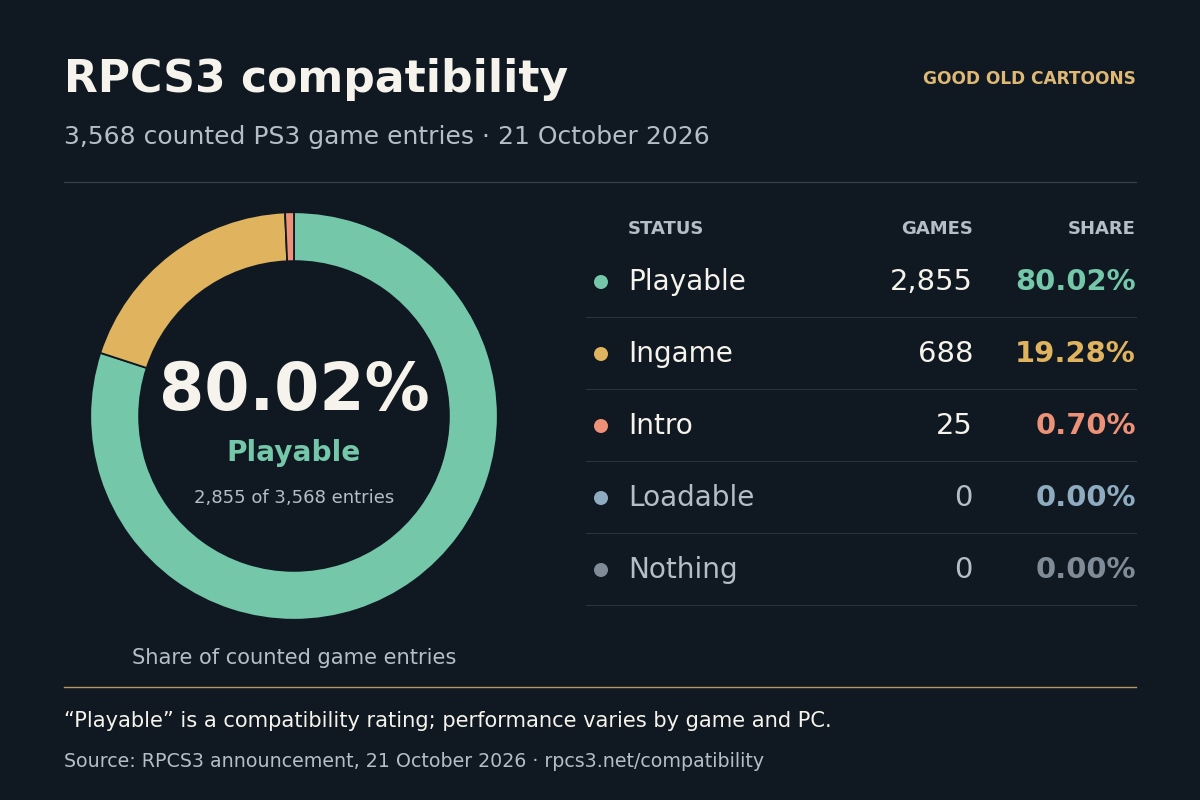
RPCS3 compatibility has reached a new milestone, with 80.02% of the PlayStation 3 game entries counted in its database now rated Playable. The development team shared the news in its 21 October 2026 announcement.
How to Set Up RPCS3 on Windows: A Beginner’s Guide
Our step-by-step tutorial covers installation, PS3 firmware, controller setup, graphics settings and adding your prepared game copies.
The free, open-source PS3 emulator is available for Windows, Linux, macOS and FreeBSD. It runs PS3 software on a computer by recreating the console’s environment, with individual compatibility reports recording what works and where problems remain.
What the RPCS3 compatibility ratings mean
The project’s compatibility list uses Playable for games that can be completed with playable performance and without game-breaking problems. Smaller faults can remain, and the rating does not promise the same performance on every computer.
At the time of the announcement, 2,855 of 3,568 counted game entries met that standard. The totals covered 1,597 disc-based games and 1,971 digital games. Regional game IDs can be grouped within an entry, so the number of IDs is larger than the number used to calculate the percentage.
Most of the remaining entries were already reaching gameplay. The Ingame category contained 688 games, or 19.28%, with problems involving completion, serious glitches or insufficient performance. Another 25 entries, or 0.70%, were in Intro: they displayed an image but did not get past the menus. Loadable and Nothing both showed zero in the counted totals.
The totals omit online-only games and applications rated Intro, Loadable or Nothing. Those exclusions matter when interpreting the zeros in the chart.
Why the PS3 is still demanding to emulate
The difficulty begins with the Cell processor’s design. It combines a general-purpose PowerPC core with specialised processing units, each with a small local memory area. Game software explicitly moves data between those areas and main memory, so the emulator has to reproduce those transfers as well as the calculations.
RPCS3 also has to recreate how those units coordinate with the RSX graphics processor and the rest of the console. Timing and memory behaviour matter: a problem may appear only when a game reaches a particular scene or uses a particular feature.

The developers attribute the latest progress to improved accuracy in CPU, GPU and PlayStation Move emulation. Move is Sony’s motion-control system, so reproducing controller-related behaviour can matter alongside processor and graphics accuracy.
What to check before playing on PC
To check a particular game, look up its exact game ID in the RPCS3 compatibility database. The entry links to a wiki page and a compatibility thread, where you can check relevant settings and the build used for testing. This is more useful for planning a playthrough than assuming that the overall percentage applies equally to every title.
The official Quickstart guide covers hardware requirements, PS3 firmware and preparing your own game copies. Follow the project’s instructions and use legitimately obtained copies. RPCS3 also follows a rolling-release development model, so recent instructions and test reports matter when choosing settings or investigating a problem.
Why this matters for PS3 game preservation
The PS3 first launched in 2006, and its games were written for that machine’s particular hardware. Keeping those games usable means preserving the software and a way to run it. As original consoles age, accurate emulation provides another route, while the emulator’s code and test reports also help document how the machine works.
Online features remain a separate concern. Reproducing a console’s hardware does not automatically recreate the remote servers a game used. A working single-player mode and a restored multiplayer service are different preservation tasks, which is another reason to read the compatibility figures alongside their counting rules.
For more emulation news, see our reports on Provenance 3.4’s Jaguar CD and arcade beta support and THEA1200, an emulation-based Amiga recreation.
Compatibility figures refer to RPCS3’s announcement of 21 October 2026. The live list changes as testing and development continue.